
Choosing the Right Expense Tracking App for Your Business
Estimated Reading Time: 10 minutes
Key Takeaways
- Expense tracking apps such as Expense Hub do much more than digitize receipts—they put your business’s entire financial story at your fingertips. Automate your tracking, access your data instantly, and actually see where every rupee goes without spreadsheets or hassles.
- Choosing the perfect app is about more than flashy dashboards. Evaluate the software’s integration capabilities (does it “talk” to your bank? Your CRM?), the strength of its reporting and budget tools, and how easy it is for actual humans to use.
- Expense Hub leads the pack because it’s built for businesses that want to scale up without tripping over admin work. It weaves automations, smart alerts, and stress-free integrations together in an interface that anyone can master—no IT degree required.
- It’s tempting to pick a free app, and for brand-new businesses, that’s fine. But as soon as you want deeper insights, faster work, and fewer mess-ups, a paid tool like Expense Hub more than pays for itself in saved hours and fewer headaches.
- Still using Excel? Upgrading supercharges your security, enables instant team collaboration, brings real-time insights, and helps avoid those painful late-night “why doesn’t this add up” moments. A good app replaces stress with clarity.
Table of Contents
- Why Businesses Need an Expense Tracker
- Key Features to Look for in an Expense Tracker App
- Benefits of a Simple Budget App
- Comparing Free and Paid Expense Trackers
- Excel Templates vs Digital Apps
- Choosing the Best Expense App
- FAQ
Why Businesses Need an Expense Tracker
A growing business is a hungry beast, and expenses multiply before you know it. Without a smart way to monitor spend, you’re not just risking the odd coffee claim—it’s easy to lose sight of where your money goes, miss tax deductions, or even let overspending spiral out of control. The right tracking app isn’t just a tool for neat records—it empowers business owners to be proactive, catch errors fast, and turn expense chaos into calm clarity. That’s how businesses keep profits strong.
Key Features to Look for in an Expense Tracker App
1. Ease of Use
If your team groans at the thought of using the app, adoption will crash and your investment tanks. Great expense trackers feel like second nature—intuitive, slick, and painless, so employees use them as intended rather than dodging the process.
2. Integration Capabilities
Your expense tracker should fit into your business like a puzzle piece. That means connecting with your accounting software, payroll, credit cards, and even your CRM—eliminating double-entry work and giving you one source of truth.
3. Customizable Reporting and Analytics
Numbers alone are just noise. Truly valuable apps turn data into visual, actionable reports—zoom in by department, project, or employee. This means trends don’t go unseen and decisions get sharper, not slower.
The Benefits of Using a Simple Budget App Like Expense Hub
Effortless Budget Tracking
Automated budget limits keep your spending guardrails up without constant babysitting. With Expense Hub, set up budgets by category, department, or event—then get flagged if someone’s about to go over. No more manual policing.
Real-Time Updates and Alerts
Expense Hub’s live notifications are your best defense against budget overruns. If something spikes out of the ordinary, you’ll know instantly—giving you time to react before it hits your cash flow.
Streamlined Approval Workflows
Approval queues shouldn’t create bottlenecks. With automated routing in Expense Hub, expenses land with the right manager fast, and everything’s documented. Approvals (and rejections) are quick, traceable, and painless.
Easy Comparison and Analysis
Need to see how Q1’s travel spend stacks up to Q2’s? Simple. Expense Hub’s custom dashboards let you stack results side by side, spot trends, and answer executive questions confidently in seconds.
Real-World Example: A marketing agency using Expense Hub set quarterly campaign budgets and helped team leads monitor spend in real time, cutting waste by 20% within two quarters.
Comparing Free and Paid Expense Trackers
Key Differences: Free vs. Paid
- Free apps offer basic tracking and limited support. For small teams on a shoestring, this can be enough short-term. But expect to outgrow them quickly as your reporting or integration needs ramp up.
- Paid solutions like Expense Hub unlock advanced analytics, automation, and deeper integrations. Paid apps scale, reduce errors, increase compliance, and give you peace of mind—freeing you up to focus on what matters most: growth.
The Value of Investing in Expense Hub
The right paid app isn’t just a cost—it’s a business investment. With time savings, fewer mistakes, and powerful analytics, Expense Hub pays for itself in both money and sanity, letting founders sleep better at night.
When to Upgrade
If your business is juggling more than half a dozen expenses each week, wrangling receipts from a growing team, or starting to lose track of what’s reimbursed and what’s not—it’s time. The transition to a robust paid tool like Expense Hub is a sign of a business that’s maturing.
Using an Expense Tracker Excel Template vs. a Digital App
Limitations of Excel Templates
- Manual entry is slow and prone to error. One typo, and your monthly totals are off—increasing the risk of reporting headaches and missed deductions.
- No built-in automation or collaboration. Sharing an Excel sheet means multiple versions, clashing edits, or that nightmare of a master file getting corrupted.
- Static, outdated data. You can’t act on last month’s numbers when business moves in real time. You need insights on demand.
The Advantages of Modern Digital Solutions
- Faster processing—up to 90% quicker—so you can close the books right and fast, even as transactions multiply.
- Improved accuracy and compliance. Rules, limits, and audit trails are built in, reducing mistakes and easing audit worries.
- Powerful analytics and heightened security mean you’re not just compliant, you’re confident—and your data is locked down tight.
Choosing the Best App to Keep Track of Expenses for Your Business
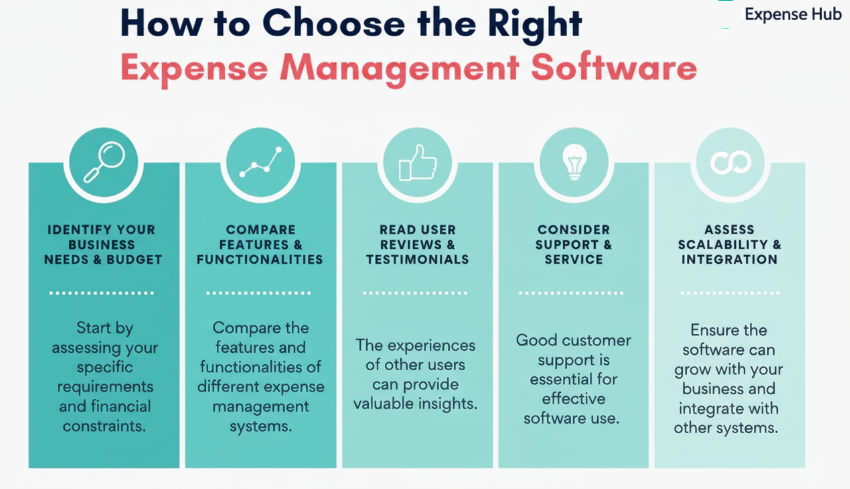
Criteria Checklist
- Scalability & Business Growth: Choose a tracker that grows as you do. Expense Hub supports startups and expands effortlessly—no painful migrations down the road.
- Features and Integrations: Make sure it integrates with accounting, banking, HR, and whatever tools you already use or will need. The point is to make everything play nice together.
- Easy Migration & Adoption: New software shouldn’t grind your business to a halt. Expense Hub is designed so your whole team can get up to speed—and on board—fast.
- Security, Support, and ROI: Prioritize robust data protection, reliable customer service, and features that deliver tangible business value.
How Expense Hub Meets Diverse Business Needs
No matter your industry or team size, Expense Hub adapts to your processes, delivering detailed insights, smart budget controls, and integrations that declutter your workflows—making expenses one less thing to worry about.
Addressing Common Concerns
Data Security
Expense Hub uses best-in-class security protocols, data encryption, and strict access controls. Your financial data is safe, private, and always accessible.
Ease of Transition
With step-by-step onboarding, responsive support, and streamlined import tools, moving your team from spreadsheets to Expense Hub is simple and fast—so you can hit the ground running with minimal friction.
Conclusion: Optimize Your Expense Management with Expense Hub
The smartest move a growing business can make? Ditch the old-school approach and harness the power of intuitive expense tracking. Expense Hub turns chaos into clarity, saves you time, and keeps you in control. Take the plunge—see what seamless expense tracking can do for your success.
Take the next step. Get Started with Expense Hub Today and see for yourself the difference modern expense tracking makes.
FAQ
- What is the best app to keep track of business expenses?
- Why should I switch from Excel to a digital expense tracker?
- What are the main advantages of a paid expense tracker?
- Is Expense Hub suitable for small businesses?
What is the best app to keep track of business expenses?
The best app is the one that makes your life easier—Expense Hub rises to the top because it delivers robust features, airtight security, effortless integrations, and a UI your team will actually use.
Why should I switch from Excel to a digital expense tracker?
Digital trackers eliminate the manual grind, slash errors, and let your business run faster and smarter. Unlike static spreadsheets, modern apps offer instant collaboration, analytics, and automation with none of the data chaos.
What are the main advantages of a paid expense tracker?
Paid apps bring advanced tools—integrations, real-time alerts, analytics, high-level support—to the table, ensuring every rupee is well spent and every audit is a breeze.
Is Expense Hub suitable for small businesses?
Absolutely. Expense Hub is as easy for a 3-person shop as it is for a 100-member team. Its flexibility and simplicity make it a smart choice for businesses at every growth stage.
“`