
- Choosing the Right Expense Tracker App for Effortless Financial Management
- What Is an Expense Tracker App? (And Why Should You Care?)
- The Benefits of Using an Expense Tracker App (Hint: It’s Not Just for Nerds)
- Expense Hub: Features and Advantages (Spoiler: It’s Built for Real Life)
- Using an Expense Tracker: A Step-by-Step Guide (No MBA Required)
- Free Expense Tracker vs. Paid Options: When to Splurge, When to Save
- The DIY Approach: Expense Tracker Excel (And Why Automation Wins)
- Still Tracking Manually? Here’s Why You Should Start Now
- Ready to Take Control of Your Finances? Here’s Your Next Step
Choosing the Right Expense Tracker App for Effortless Financial Management
Let’s play a quick game: Close your eyes and picture your money sitting peacefully in your bank account, completely undisturbed. Now, fast forward one Amazon “Buy Now” click, a spontaneous flat white, a well-deserved sushi splurge, plus a subscription you totally forgot about. Open your eyes — and poof! Your account balance has Houdinied its way down a black hole. Where’d it all go?
If you’ve ever screamed internally at your end-of-month bank statement or found yourself muttering, “That’s odd. Who spent all my money?”, you’re not alone. Managing finances — both personal and business — is less like balancing a checkbook and more like dodging financial landmines in a jungle of receipts, debit notifications, and late-night snack runs.
But what if managing your money didn’t feel like a wild guessing game or an emergency room visit for your wallet? Enter the expense tracker app: the rescue helicopter hovering over your financial chaos. Nowadays, having the right app isn’t just nice — it’s essential. Picking one that fits your workflow is the move that separates the panicked from the intentional.
And if efficiency, clarity, and user-friendliness ring your bells, let me introduce Expense Hub. This is not your “spreadsheet at midnight” kind of tool. With its intuitive interface and efficient syncing across all your devices, it’s tailor-made for busy professionals, side hustlers, and anyone who’s ever scratched their head over a bank statement. Consider it your financial Swiss Army knife — practical, powerful, surprisingly simple to use.
But, before you grab just any expense tracker app and unleash it on your budget, let’s unpack what these nifty tools are, why they’ve become must-haves, and how Expense Hub stands tall among financial management giants like Mint and Expensify (https://www.expensify.com/blog/personal-expense-tracker-apps), Because picking a tool without knowing what matters is like picking a life jacket before checking if it even floats.
What Is an Expense Tracker App? (And Why Should You Care?)
Let’s demystify things for a moment. Imagine you had a wallet with tiny elves inside, feverishly noting down every penny you spend, categorizing it instantly, and even nudging you if your fast-food habit got a little too spicy for your budget. That’s basically an expense tracker app — minus the elves (they unionized).
But here’s the real talk: An expense tracker app is a digital powerhouse that helps you organize, monitor, and analyze every financial transaction — from that business client lunch to the 99-cent app you forgot you bought.
Core Features: More Than Just Tallying Pennies
Expense Hub, like other top-tier contenders, rolls a suite of critical features into its package:
- Real-Time Tracking: Forget end-of-month shock. Every purchase appears instantly, like magic — or, more accurately, like a team of code wizards working in the background.
- Budgeting Tools: Set smart budgets for your rent, coffee, or that weirdly expensive hobby you swear is an investment.
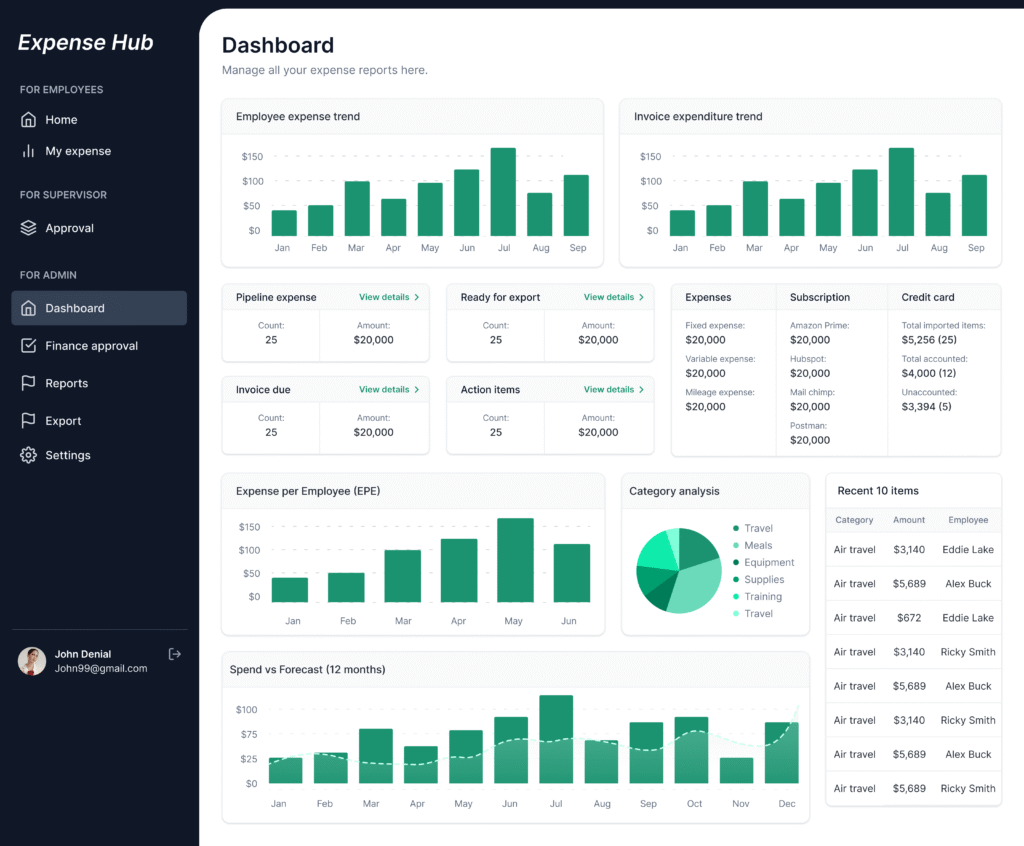
- Analytics & Reporting: Turn numbers into meaning. See graphs, automatic categorization, and monthly summaries that even your fifth-grade self could understand.
- Multi-Currency Support & Sync: Jet-setters and digital nomads, rejoice. Expense Hub keeps up, even if your life looks like an episode of “Where in the World is Carmen Sandiego?”.
- Bank Integration: Syncs with your accounts, so you don’t need to squint at Excel columns or do “mental math” (which, let’s be honest, never ends well).
- AI-Powered Features: Like Expensify’s famed receipt capture and AI categorization (https://www.expensify.com/blog/personal-expense-tracker-apps), Expense Hub effortlessly sorts your info without you lifting a finger.
Let’s be real — this isn’t just about tracking; it’s about winning the game of money without needing a finance degree or a crystal ball.
Curious how all these features create next-level financial management? Check out https://blog.expensehub.io/unlocking-efficiency-expense-management-software for a deeper dive.
For newcomers asking “what is an expense tracker and why do I need one?”, https://www.expensify.com/blog/personal-expense-tracker-apps. Spoiler: You’ll wonder how you ever did math without it.
The Benefits of Using an Expense Tracker App (Hint: It’s Not Just for Nerds)
There’s a reason expense tracker apps have become the personal trainers of the finance world. But instead of yelling at you for dropping a donut, they’re your coach in the journey toward better money habits.
1. Financial Literacy, Unlocked
Ever peeked at your statements and thought, “Did someone really buy 17 lattes last month?” Expense trackers reveal your habits, the good, the bad, and the “that’s-not-me-I-swear.”
- Visualization: Pie charts, bar graphs, and heat maps make your spending more obvious than a surprise birthday party thrown by your accountant. You can’t ignore the truth.
- Pattern Recognition: Maybe you always overspend on holidays? Or Tuesdays? Expense Hub tracks these so you actually see trends (and fix them).
- Actionable Insights: By knowing where your money goes, you can redirect it. Cancel a double-dipping subscription, funnel more cash into investments, or heck, reward yourself for coming in under budget.
2. Budget Compliance: Automation Works While You Sleep
Manual budgeting is about as fun as alphabetizing your sock drawer. With automated tools like Expense Hub’s free expense tracker, you never miss a beat (or a payment). Budgets are pre-set, and every purchase is matched in real time, so overages don’t sneak up on you like a ninja in the night.
- Automated Alerts: Overspending? The app pings you before things spiral out of control.
- Scheduled Reminders: Set it and forget it — until you need to remember, of course.
First-time user? There’s a reason many modern apps (think Mint, Expensify, and, you guessed it, Expense Hub) offer robust free tiers — to get you hooked on actually knowing your financial health (https://www.nerdwallet.com/p/best/finance/expense-tracker-apps). Expense Hub keeps that entry barrier low, so your journey to mastery starts, well, today.
3. Expense Tracker Advantage: Automation Obliterates Excel
Now, let’s get controversial. Is Excel great? Absolutely, if you’re a robot or have unlimited patience. Everyone else? Welcome to the age of automation. The classic spreadsheet approach is riddled with human error (who hasn’t missed a decimal or added an extra zero and thought they had a million bucks for a day?). Expense Hub brings:
- Zero manual entry: Real-time bank sync = fewer mistakes, more bubbles in your bath.
- Time savings: Stop copy-pasting receipts. Relax — “admin night” is now movie night instead.
- Error-free Reports: AI doesn’t get distracted by cat videos.
For more on this digital showdown, check out https://blog.expensehub.io/manual-expense-tracking-vs-automation and see how much time and sanity you can save.
Expense Hub: Features and Advantages (Spoiler: It’s Built for Real Life)
There’s no shortage of expense tracker apps on the shelf. But once you’ve tested enough of them, you realize most are either too simple for real needs or so complicated you might as well go back to pen and paper. Expense Hub? Let’s just say Goldilocks would approve: Not too basic, not too confusing — just right.
Effortless Usability Meets Global Power
- User-Friendly Design: No 60-page instruction manual. Open, tap, done. If you can order takeout, you can master Expense Hub.
- Multi-Currency & Device Sync: The world is your oyster! Switch currencies, sync changes instantly from phone to laptop to tablet (good luck doing that with old-school ledgers).
- Bank & Tool Integrations: Live linking with your accounts keeps data fresh and accurate. No guesswork, no “pending transactions” mysteries.
- Analytics for Days: Expense Hub spits out graphs, trends, and forecast tools clearer than a weather report. Finally understand how your money is working — or not.
Comparison: Expense Hub vs. The Usual Suspects (Mint, Expensify & More)
So, how does Expense Hub stack up? Let’s peek under the hood:
- Expensify: Fantastic for receipt scanning and AI-powered categorization. Great for corporate travelers, but Expense Hub brings those perks plus multi-currency superpowers and a more streamlined interface (https://www.expensify.com/blog/personal-expense-tracker-apps).
- Mint: Loved for its bill tracking and notifications, but sometimes feels like a maze. Expense Hub’s dashboard is just… easier. One tap, all your answers.
- Excel: Still the king of DIY… if you like squinting and are a glutton for punishment. Expense Hub automates everything (https://www.nerdwallet.com/p/best/finance/expense-tracker-apps).
Not convinced? You’ll want to dig into https://blog.expensehub.io/choosing-expense-tracking-app for the full breakdown.
Security: Because Your Data Matters
With banking breaches making headlines, security is top-of-mind (unless you’re living off the grid, Survivor-style). Expense Hub leads with bank-level encryption, two-factor authentication, and privacy-first design. Your info is safer than your grandma’s cookie recipe.
Using an Expense Tracker: A Step-by-Step Guide (No MBA Required)
So you’ve downloaded another app. It’s staring at you, all shiny and full of promise. But how do you actually use an expense tracker? Here’s how to turn theory into muscle memory, with Expense Hub taking the starring role.
Step 1: Download & Dive In
- Find the App: Search for Expense Hub on the App Store, Google Play, or head straight to their website. Bonus: it’s got a free expense tracker to start.
- Blast Through Setup: The onboarding is like assembling IKEA furniture — minus the leftover screws and Swedish manual.
Step 2: Connect Your Bank Accounts & Set Budgets
- Seamless Sync: Link your bank accounts in a few taps. No, you don’t need your online banking password scrawled on a sticky note.
- Creating Budgets: Assign budgets by category — groceries, entertainment, subscriptions, business expenses, you name it. Expense Hub suggests sensible targets based on your previous spending, so you’re not flying blind.
Pro Tip: Set up alerts for when you’re nearing a limit. You’ll get a nudge before you hit that budget wall, not after.
Step 3: Make It a Routine (With Reports & Trends)
- Daily or Weekly Check-ins: Five minutes a week. Seriously — check-in, see the dashboard, smile smugly at your newfound mastery.
- Generate Reports: Visualize spending by category, vendor, or time frame. Notice you’re spending more on streaming than groceries? Congrats, you’re officially an adult. Or at least a very well-fed couch potato.
- Course Correction: Use these reports to adjust — cut nonessentials, ramp up savings, or allow a guilt-free splurge.
Expense Hub is designed so even first-timers feel like pros. (Need a little extra hand-holding? Here’s the https://blog.expensehub.io/unlocking-efficiency-expense-management-software for visual learners and spreadsheet curmudgeons alike.)
Still skeptical? Check out these personal experiences with using expense apps (https://www.expensify.com/blog/personal-expense-tracker-apps). Spoiler: Even technophobes are converted.
Free Expense Tracker vs. Paid Options: When to Splurge, When to Save
Let’s face it. Free is everyone’s favorite flavor. But is it always the best? Expense tracker apps vary — from barebones freebies to luxury compound calculators worthy of a Wall Street analyst.
What You Get for Free
Most top apps, including Expense Hub, serve up a generous spread for zero dollars:
- Core Expense Tracking
- Budget Assignments by Category
- Basic Reports
- Synced Transactions (sometimes with a daily refresh cap)
- App Usage Across Devices
For a budding financial planner, side hustler, or anyone who’d rather not pay for lunch with last week’s receipts, the free expense tracker will cover 90% of your needs (https://www.nerdwallet.com/p/best/finance/expense-tracker-apps).
When It Makes Sense to Pay
Let’s say you’re running a small business. Maybe you want real-time multi-institution sync, deeper analytics, or priority support for those “uh-oh” moments. Expense Hub’s premium tier piles on:
- Advanced Reporting & Forecasting
- Multiple Account Integrations
- Enhanced Security Features
- Team Collaboration (for small businesses)
- Receipt Capture and AI Auto-Categorization
So, when should you upgrade? If you’re juggling lots of accounts, facing complex business deductions, or just need a financial command center bigger than a postage stamp, upgrade away (https://www.expensify.com/blog/personal-expense-tracker-apps).
Curious about the tipping point? Here’s a deeper read on https://blog.expensehub.io/unlocking-efficiency-expense-management-software.
The DIY Approach: Expense Tracker Excel (And Why Automation Wins)
Raise your hand if you’ve ever downloaded an “Expense Tracker Excel” template, felt accomplished, then abandoned it after a week because you forgot to log half your purchases and the pivot tables mutated into arcane hieroglyphics.
Manual spreadsheet tracking is technically doable. It lets you design every cell, sure. But it’s a magnet for errors and lost evenings. Here’s the cold, hard truth:
- Manual Entry = Mistakes: Wrong formulas, missed receipts, or that “what did I buy at 7-Eleven?” moment.
- Time Sink: Five minutes per day is 1825 lost minutes a year. That’s a whole season of your favorite Netflix show!
- Analysis Paralysis: Spreadsheets don’t tell stories — they hide them, leaving you to decode what matters.
- No Security: Try password-protecting your spreadsheet. Now remember that password…
Expense Hub, by contrast, automates everything, from importing bank data to categorizing transactions, so you focus on what matters: making smarter money choices, not counting beans one by one.
If you’re curious about the DIY path, here’s a https://blog.expensehub.io/choosing-expense-tracking-app. But to truly see why automation is king, read about how to https://blog.expensehub.io/manual-expense-tracking-vs-automation — your sanity will thank you.
Craving even more detail? NerdWallet’s exhaustive comparison (https://www.nerdwallet.com/p/best/finance/expense-tracker-apps) spells out why apps like Expense Hub outpace the humble spreadsheet.
Still Tracking Manually? Here’s Why You Should Start Now
There’s a famous saying: “The best time to plant a tree was 20 years ago. The second-best time is today.” The same goes for taking control of your finances. Stop waiting for “next payday.” Expense tracking isn’t just for the broke or the obsessive. It’s how you build a habit loop that pays dividends for life.
The proof is in the pudding — and the testimonials. Users across the globe are cutting overspending, slashing debt, and actually sticking to those blasted budgets (even if it means fewer midnight tacos). Real stories. Real wins.
Expense Hub has become the tool of choice for people who finally wanted an app that understands real life: unpredictable, messy, busy, and global.
Ready to Take Control of Your Finances? Here’s Your Next Step
Let’s be blunt — every day you put off tracking your expenses is another day you’re making your wallet’s life way harder than it needs to be. Why juggle receipts or risk overdraft charges when you can see your whole financial picture at a glance?
Expense Hub puts you back in the driver’s seat, whether you’re budgeting bread for the week, managing a freelance empire, or just want to stop feeling shocked by your spending. Its free expense tracker removes every excuse. Security? Bulletproof. Features? As deep as you need, right from day one. Peace of mind? Priceless.
Start now: https://expensehub.io
Related reads to supercharge your financial journey:
- https://blog.expensehub.io/unlocking-efficiency-expense-management-software
- https://blog.expensehub.io/manual-expense-tracking-vs-automation
- https://blog.expensehub.io/choosing-expense-tracking-app
- https://blog.expensehub.io/unlocking-efficiency-expense-management-software
- https://blog.expensehub.io/unlocking-efficiency-expense-management-software
- https://blog.expensehub.io/manual-expense-tracking-vs-automation
Want proof? Try Expense Hub’s free plan and see the difference for yourself. Because your money’s too important for guesswork — and life’s too short for late-night spreadsheet therapy.